MEvent
- class maelzel.core.event.MEvent(dur, offset=None, amp=None, parent=None, properties=None, symbols=None, label='', dynamic='', tied=False)[source]
Bases:
MObjAbstract class representing a discrete event in time (a Note, Chord, etc)
Note
an MEvent cannot be created on its own, it is the base class for all notes, chord, clips, etc.
- Parameters:
dur (
Fraction) – the duration of the object, in beatsoffset (
Optional[Fraction]) – an explicit offset (start time) in beatsamp (
Optional[float]) – an amplitude valueparent (
Optional[MContainer]) – the parent of this object, if anyproperties (
Optional[dict[str,Any]]) – user-defined propertiessymbols (
Optional[list[Symbol]]) – notations symbols attached to this eventlabel – a label for this object
dynamic – a dynamic as string, if applicable
tied – is this event tied to the next event?
Attributes Summary
The playback amplitude 0-1 of this note.
The duration of this object, in quarternotes
A musical dynamic (pppp, ppp, ..., mp, mf, f, ..., ffff)
The end time of this object.
The end target of this event, if any
a label can be used to identify an object within a group of objects
A string representing this event
Optional offset, in quarternotes.
The parent of this object.
playargs are set via
setPlay()and are used to customize playback (instr, gain, …).User-defined properties as a dict (None by default).
A list of all symbols added via
addSymbol()(None by default)Is this event tied?
Methods Summary
absEnd()Returns the absolute end of this offset, as quarternotes
Returns the absolute offset of this object in quarternotes
Returns the ScoreStruct active for this obj or its parent.
addSpanner(spanner[, endobj])Adds a spanner symbol to this object
addSymbol(*args, **kws)Add a notation symbol to this object
addText(text[, placement, italic, weight, ...])Add a text annotation to this object
asGrace([slash, stemless, value])automate(param, breakpoints[, ...])Add an automation action to this event
clone(**kws)Clone this object, changing parameters if needed
copy()Returns a copy of this object
cropped(start, end)A copy of Self, cropped to the given time range
dump([indents, forcetext])Prints all relevant information about this object
durSecs()Returns the duration in seconds according to the active score
getConfig([prototype])Returns a CoreConfig overloaded with options set for this object
getPlay(key[, default, recursive])Get a playback attribute previously set via
MObj.setPlay()getProperty(key[, default])Get a property of this objects
getSymbol(classname)Get a symbol of a given class, if present
invertPitch(pivot)Invert the pitch of this object
isGrace()Is this a grace note?
Is this event linked to the next?
Is this event linked to the previous?
isRest()Is this a rest?
location()Returns the location of this object within the active score struct
The mean pitch of this object
mergeWith(other)Merge this with other, return None if not possible
Return the event next to self within the parent container
The absolute offset of the parent
The pitch range of this object, if applicable
pitchTransform(pitchmap)Apply a pitch-transform to this object, returns a copy
play([instr, delay, args, gain, chan, ...])Plays this object.
plot([axes, figsize, timeSignatures, grid])Plot this object
Return the event previous to self
quantizePitch([step])Returns a new object, with pitch rounded to step
quantizedScore([scorestruct, config, ...])Returns a QuantizedScore representing this object
rec([outfile, sr, verbose, wait, nchnls, ...])Record the output of .play as a soundfile
relEnd()Resolved end of this object, relative to its parent
Resolve the offset of this object, relative to its parent
remap(deststruct[, sourcestruct])Creates a clone, remapping times from source scorestruct to destination scorestruct
render([backend, renderoptions, ...])Renders this object as notation
Resolve the dynamic at the given note
root()The root of this object or None if this object has no parent
Returns the ScoreStruct active for this obj or its parent (recursively)
scoringEvents([groupid, config, parentOffset])Returns its notated form as scoring.Notations
scoringParts([config])Returns this object as a list of scoring UnquantizedParts.
setPlay(**kws)Set any playback attributes, returns self
setProperty(key, value)Set a property, returns self
show([fmt, external, backend, scorestruct, ...])Show this as notation.
splitAt(offset[, tie, nomerge])Split this event at the given absolute offset
splitAtOffsets(offsets[, tie, nomerge])Split this event at the given offsets
synthEvents([instr, delay, args, gain, ...])Returns the SynthEvents needed to play this object
Returns a tuple (starttime, endtime), in seconds
timeScale(factor[, offset])Create a copy with modified timing by applying a linear transformation
timeShift(offset)Return a copy of this object with an added offset
timeShiftInPlace(offset)Shift the time of this by the given offset (inplace)
timeTransform(timemap[, inplace])Apply a transformation to the time axes of this event
transpose(interval)Transpose this object by the given interval
transposeByRatio(ratio)Transpose this by a given frequency ratio, if applicable
unquantizedScore([title])Create a maelzel.scoring.UnquantizedScore from this object
withExplicitOffset([forcecopy])Copy of self with explicit times
write(outfile[, backend, resolution, format])Export to multiple formats
Attributes Documentation
- amp: float | None
The playback amplitude 0-1 of this note. None if not set
- dur
The duration of this object, in quarternotes
- dynamic: str
A musical dynamic (pppp, ppp, …, mp, mf, f, …, ffff)
- gliss
The end target of this event, if any
- label: str
a label can be used to identify an object within a group of objects
- name
A string representing this event
- offset: F | None
Optional offset, in quarternotes. Specifies the start time relative to its parent
It can be None, which indicates that within a container this object would start after the previous object. For an object without a parent, the offset is an absolute offset.
- parent
- playargs: PlayArgs | None
playargs are set via
setPlay()and are used to customize playback (instr, gain, …). None by default
- properties: dict[str, _t.Any] | None
User-defined properties as a dict (None by default). Set them via
setProperty()
- symbols: list[_symbols.Symbol] | None
A list of all symbols added via
addSymbol()(None by default)
- tied: bool
Is this event tied?
Methods Documentation
- absEnd()
Returns the absolute end of this offset, as quarternotes
If this object is embedded (has a parent) in a container, its absolute end depends on the offset of its parent, recursively. If the object has no parent then the absolute offset is just the resolved offset
- Return type:
Fraction- Returns:
the absolute end position of this object
- absOffset()
Returns the absolute offset of this object in quarternotes
If this object is embedded (has a parent) in a container, its absolute offset depends on the offset of its parent, recursively. If the object has no parent then the absolute offset is just the resolved offset
- Return type:
Fraction- Returns:
the absolute start position of this object
- activeScorestruct()
Returns the ScoreStruct active for this obj or its parent.
Otherwise returns the scorestruct for the active workspace
- Return type:
ScoreStruct
- Returns:
the active scorestruct for this object
See also
MObj.scorestruct()
- addSpanner(spanner, endobj=None)[source]
Adds a spanner symbol to this object
A spanner is a slur, line or any other symbol attached to two or more objects. A spanner always has a start and an end.
- Parameters:
spanner (
str|Spanner) – a Spanner object or a spanner description (one of ‘slur’, ‘<’, ‘>’, ‘trill’, ‘bracket’, etc. - seemaelzel.core.symbols.makeSpanner()When passing a string description, prepend it with ‘~’ to create an end spannerendobj (
Optional[MEvent]) – the object where this spanner ends, if known
- Return type:
Self- Returns:
self (allows to chain calls)
Example
>>> from maelzel.core import *
>>> a = Note("4C")
>>> b = Note("4E")
>>> c = Note("4G")
>>> a.addSpanner('slur', c)
>>> chain = Chain([a, b, c])
See also
In some cases the end target can be inferred:
>>> chain = Chain([
... Note("4C", 1, dynamic='p').addSpanner("<"),
... Note("4D", 0.5),
... Note("4E", dynamic='f')   # This ends the hairpin spanner
... ])
Or it can be set later
>>> chain = Chain([
... Note("4C", 1).addSpanner("slur"),
... Note("4D", 0.5),
... Note("4E").addSpanner("~slur")   # This ends the last slur spanner
... ])
- addSymbol(*args, **kws)[source]
Add a notation symbol to this object
Notation symbols are attributes attached to one event and are intended for notation only. Such symbols include articulations, ornaments, fermatas but also properties, like color, size, etc. Also customizations like notehead shape, bend signs, all are considered symbols. Notation symbols spanning across multiple events (like slurs, crescendo hairpins, lines, etc.) are considered spanners and are added via
addSpanner()Some symbols are exclusive, meaning that adding a symbol of this kind will replace a previously set symbol. Exclusive symbols include any properties (color, size, etc) and other customizations like notehead shape
Note
Dynamics are not treated as symbols since they can also be used for playback
Example
>>> from maelzel.core import *
>>> n = Note(60)
>>> n.addSymbol(symbols.Articulation('accent'))
# The same can be achieved via keyword arguments:
>>> n.addSymbol(articulation='accent')
# Multiple symbols can be added at once:
>>> n = Note(60).addSymbol(text='dolce', articulation='tenuto')
>>> n2 = Note("4G").addSymbol(symbols.Articulation('accent'), symbols.Ornament('mordent'))
# Known symbols - most common symbols don't actually need keyword arguments:
>>> n = Note("4Db").addSymbol('accent').addSymbol('fermata')
# Some symbols can take customizations:
>>> n3 = Note("4C+:1/3").addSymbol(symbols.Harmonic(interval='4th'))
- Return type:
Self- Returns:
self (similar to setPlay, allows to chain calls)
Symbol
Possible Values
text
any text
notehead
cross, harmonic, triangleup, xcircle, triangle, rhombus, square, rectangle
articulation
accent, staccato, tenuto, marcato, staccatissimo, etc.
size
A relative size (0=default, 1, 2, …=bigger, -1, -2, … = smaller)
color
a css color
- addText(text, placement='above', italic=False, weight='normal', fontsize=None, fontfamily='', box='')
Add a text annotation to this object
This is a shortcut to
self.addSymbol(symbols.Text(...)). Use that for in-depth customization.- Parameters:
text (str) – the text annotation
placement – where to place the annotation (‘above’, ‘below’)
italic – if True, use italic as font style
weight – ‘normal’ or ‘bold’
fontsize (int | None) – the size of the annotation
fontfamily – the font family to use. It is probably best to leave this unset
box – the enclosure shape, or ‘’ for no box around the text. Possible shapes are ‘square’, ‘circle’, ‘rounded’
- Return type:
Self
- Returns:
self. This can be used to create an object and add text in one call
Example
>>> chain = Chain([
...     Note("4C", 1).addText('do'),
...     Note("4D", 1).addText('re')
... ])
>>> chain

- automate(param, breakpoints, interpolation='linear', relative=True)[source]
Add an automation action to this event
- Parameters:
param (
str) – the playback parameter to modify, either a builtin parameter like position, or an instrument defined parameter (for example, an instrument based on substractive synthesis could define a ‘filterattack’ parameter, or a vocal synthesis instrument could define a ‘vibratoamount’ parameter)breakpoints (
list[tuple[Union[int,float,Fraction,tuple[int,Union[int,float,Fraction]]],float]] |list[tuple[Union[int,float,Fraction,tuple[int,Union[int,float,Fraction]]],float,str]] |list[Union[int,float,Fraction]]) – the data, a list of pairs in the form (time, value), or (time, value, interpolation). time is given in quarternotes or as a location (measure, beatoffset); value is any valid valud for the given parameter; interpolation is one of ‘linear’, ‘cos’. As a shortcut it is possible to also pass a flat list of the form [time0, value0, time1, value1, …]. A single point is also possible. This sets the value for the given param at the specified timeinterpolation – default interpolation used for breakpoints without interpolation
relative – if True, the time positions are relative to the absolute offset of this event. If False, these times are absolute times
- Return type:
None
Example
note = Note("4c", 10)

# Automate position starting at beat 5 after this event has started
note.automate('position', [(5, 0.), (6, 1.)], relative=True)

# The same data can be given as a flat list
note.automate('position', [5, 0., 6, 1.])

# Time position can be also given as a tuple (measure num, beat offset),
# and the time mode can be set to absolute
# In this case, this automation indicates a modification of the
# pan position, from 0 to 1 starting at the 4th measure (index 3) and
# ending at the 5th measure (index 4)
note.automate('position', [(3, 0), 0., (4, 0), 1.], relative=False)
Any dynamic parameter can be automated:
# Define a preset with some dynamic parameter

defPreset('detuned', '''
|kdetune=2|
    aout1 = oscili:a(kamp, kfreq) + oscili:a(kamp, kfreq+kdetune)
''')

# Automate the kdetune param. When automating a Note/Chord, the times
# are given in quarterbeats, which means that the real time in seconds
# depend on the tempo structure. In this case the kdetune param will
# be shifted from 0 to 20 starting at the moment the note is played
# and ending 4 **quarterbeats** after.
note.automate('kdetune', (0, 0, 4, 20))

# When the note is actually played the automation takes effect
synth = note.play(instr='detuned')

# The synth itself can be automated. In this case, we are already
# in the real-time realm and any times are given in seconds. If
# needed the active scorestruct can be used to convert between
# quarterbeats and seconds
synth.automate('position', (2, 0.5, 4, 1))
- clone(**kws)
Clone this object, changing parameters if needed
- Parameters:
**kws – any keywords passed to the constructor
- Return type:
Self
- Returns:
a clone of this object, with the given arguments changed
Example:
>>> from maelzel.core import *
>>> a = Note("C4+", dur=1)
>>> b = a.clone(dur=0.5)
- copy()
Returns a copy of this object
- Return type:
Self
- cropped(start, end)[source]
A copy of Self, cropped to the given time range
The returned event will have an explicit offset set to its absolute offset. It is parentless
- Parameters:
start (
Union[int,float,Fraction,tuple[int,Union[int,float,Fraction]]]) – the start location to crop this eventend (
Union[int,float,Fraction,tuple[int,Union[int,float,Fraction]]]) – the end location to crop this event
- Return type:
Self- Returns:
the cropped event
- dump(indents=0, forcetext=False)
Prints all relevant information about this object
- Parameters:
indents – number of indents
forcetext – if True, force text output via print instead of html even when running inside jupyter
- durSecs()
Returns the duration in seconds according to the active score
- Return type:
Fraction- Returns:
the duration of self in seconds
- getConfig(prototype=None)
Returns a CoreConfig overloaded with options set for this object
- Parameters:
prototype (
Optional[CoreConfig]) – the config to use as prototype, falls back to the active config- Return type:
CoreConfig|None- Returns:
A clone of the active config with any customizations made via
Voice.setConfig()orVoice.configQuantization()If no customizations have been made, None is returned
See also
- getPlay(key, default=None, recursive=True)
Get a playback attribute previously set via
MObj.setPlay()All locally set playback attributes are accessible via the
MEvent.playargsattribute. This method checks not only the locally set attributes, but any attribute set by the parent- Parameters:
key (
str) – the key (see setPlay for possible keys)default – the value to return if the given key has not been set
recursive – if True, search the given attribute up the parent chain
- Returns:
either the value previously set, or default otherwise.
- getProperty(key, default=None)
Get a property of this objects
An MObj can have multiple properties. A property is a key:value pair, where the key is a string and the value can be anything. Properties can be used to attach information to an object, to tag it in any way needed.
Properties are set via
MObj.setProperty(). TheMObj.propertiesattribute can be queries directly, but bear in mind that if no properties have been set, this attribute is ``None`` by default.- Parameters:
key (
str) – the property to querydefault – returned value if the property has not been set
- Returns:
the value of the property, or the default value
See also
- getSymbol(classname)
Get a symbol of a given class, if present
This is only supported for symbol classes which are exclusive (notehead, color, ornament, etc.). For symbols like ‘articulation’, which can be present multiple times, query the symbols attribute directly (NB: symbols might be
Noneif no symbols have been set):if note.symbols: articulations = [s for s in note.symbols if s.name == 'articulation']
- Parameters:
classname (str) – the class of the symbol. Possible values are ‘articulation’, ‘text’, ‘notehead’, ‘color’, ‘ornament’, ‘fermata’, ‘notatedpitch’. See XXX (TODO) for a complete list
- Return type:
_symbols.Symbol | None
- Returns:
a symbol of the given class, or None
- invertPitch(pivot)
Invert the pitch of this object
- Parameters:
pivot (str | float | int) – the point around which to invert pitches
- Return type:
Self
- Returns:
the inverted object
>>> from maelzel.core import *
>>> series = Chain("4Bb 4E 4F# 4Eb 4F 4A 5D 5C# 4G 4G# 4B 5C".split())
>>> inverted = series.invertPitch("4F#")
>>> print(" ".join(_.name.ljust(4) for _ in series))
... print(" ".join(_.name.ljust(4) for _ in inverted))
4A#  4E   4F#  4D#  4F   4A   5D   5C#  4G   4G#  4B   5C
4D   4G#  4F#  4A   4G   4D#  3A#  3B   4F   4E   4C#  4C
>>> Score([series, inverted])

- isGrace()[source]
Is this a grace note?
A grace note has a pitch but no duration
- Return type:
bool- Returns:
True if this can be considered a grace note
- isLinkedNext()[source]
Is this event linked to the next?
An event is linked to a next event if it is tied or has glissando set to True where this applies. This is not the case if the event has a gliss value set to other than True
- Return type:
bool
- isLinkedPrev()[source]
Is this event linked to the previous?
This can only be assessed if this event is part of a container. A free standing event will always return False
- Return type:
bool
- location()
Returns the location of this object within the active score struct
- Return type:
tuple[location_t, location_t]
- Returns:
a tuple
(startlocation, endlocation)where bothstartlocationare tuples(measureindex, beatoffset)representing the position of this object within the score
Example
>>> setScoreStruct(timesig='3/4')
>>> note = Note("4C", 1, offset=5)
>>> note.location()
((1, Fraction(2, 1)), (2, Fraction(0, 1)))
The note starts at measure 1, beat 2 and ends at measure 2, beat 0 (both measures and beats start at 0)
- meanPitch()
The mean pitch of this object
- Return type:
float|None- Returns:
The mean pitch of this object
- mergeWith(other)[source]
Merge this with other, return None if not possible
- Parameters:
other (
MEvent) – the event to concatenato to this. Only events of the same type can be merged (a Note with a Note, a Chord with a Chord)- Return type:
Optional[Self]- Returns:
the merged event, or None
- nextEvent()[source]
Return the event next to self within the parent container
This only applies if self has a parent
- Return type:
MEvent|None- Returns:
the next event within the parent container, or None
- parentAbsOffset()
The absolute offset of the parent
- Return type:
Fraction- Returns:
the absolute offset of the parent if this object has a parent, else 0
- pitchRange()
The pitch range of this object, if applicable
This is useful in order to assign this object to a proper Voice when distributing objects among voices
- Return type:
tuple[float,float] |None- Returns:
either None or a tuple (lowest pitch, highest pitch)
- pitchTransform(pitchmap)
Apply a pitch-transform to this object, returns a copy
- Parameters:
pitchmap (_t.Callable[[float], float]) – a function mapping pitch to pitch
- Return type:
Self
- Returns:
the object after the transform
- play(instr='', delay=None, args=None, gain=None, chan=None, pitchinterpol='', fade=None, fadeshape='', position=None, skip=None, end=None, whenfinished=None, sustain=None, workspace=None, transpose=0, config=None, display=False, **kwargs)
Plays this object.
Play is always asynchronous (to block, use some sleep funcion). By default,
play()schedules this event to be renderer in realtime.Note
To record events offline, see the example below
- Parameters:
gain (float | None) – modifies the own amplitude for playback/recording (0-1)
delay (float | None) – delay in seconds, added to the start of the object As opposed to the .offset attribute of each object, which is defined in symbolic (beat) time, the delay is always in real (seconds) time. Delay can be negative, in which case synth events start the given amount of seconds earlier.
instr – which instrument to use (see defPreset, definedPresets). Use “?” to select from a list of defined presets.
chan (int | None) – the channel to output to. Channels start at 1
pitchinterpol – ‘linear’, ‘cos’, ‘freqlinear’, ‘freqcos’
fade (float | tuple[float, float] | None) – fade duration in seconds, can be a tuple (fadein, fadeout)
fadeshape – ‘linear’ | ‘cos’
args (dict[str, float] | None) – arguments passed to the note. A dict
{paramName: value}position (float | None) – the panning position (0=left, 1=right)
skip (float | None) – amount of time (in quarternotes) to skip. Allows to play a fragment of the object (NB: this trims the playback of the object. Use
delayto offset the playback in time while keeping the playback time unmodified)end (float | None) – end time of playback. Allows to play a fragment of the object by trimming the end of the playback
sustain (float | None) – a time added to the playback events to facilitate overlapping/legato between notes, or to allow one-shot samples to play completely without being cropped.
workspace (Workspace | None) – a Workspace. If given, overrides the current workspace. It’s scorestruct is used to to determine the mapping between beat-time and real-time.
transpose (float) – add a transposition interval to the pitch of this object
config (CoreConfig | None) – if given, overrides the current config
whenfinished (_t.Callable | None) – function to be called when the playback is finished. Only applies to realtime rendering
display – if True and running inside Jupyter, display the resulting synth’s html
- Return type:
csoundengine.synth.SynthGroup
- Returns:
A
SynthGroup
See also
Example
Play a note
>>> from maelzel.core import *
>>> note = Note(60).play(gain=0.1, chan=2)
Play multiple objects synchronised
>>> play(
... Note(60, 1.5).synthEvents(gain=0.1, position=0.5)
... Chord("4E 4G", 2, start=1.2).synthEvents(instr='piano')
... )
Or using play as a context managger:
>>> with play():
...     Note(60, 1.5).play(gain=0.1, position=0.5)
...     Chord("4E 4G", 2, start=1.2).play(instr='piano')
...     ...
Render offline
>>> with render("out.wav", sr=44100) as r:
...     Note(60, 5).play(gain=0.1, chan=2)
...     Chord("4E 4G", 3).play(instr='piano')
- plot(axes=None, figsize=(15, 5), timeSignatures=True, grid=True, **kws)
Plot this object
To see all supported options, see
maelzel.core.plotting.plotVoices()- Parameters:
axes (Axes | None) – use this Axes, if given
figsize (tuple[int, int]) – figure size of the plot, if not axes is given (otherwise uses the figure corresponding to the given axes)
timeSignatures – draw time signatures
grid – draw a grid
kws – passed to maelzel.core.plotting.plotVoices
- Return type:
Axes
- Returns:
the axes used
- previousEvent()[source]
Return the event previous to self
This only applies if self has a parent
- Return type:
MEvent|None- Returns:
the previous event within the parent container, or None
- quantizePitch(step=0.0)
Returns a new object, with pitch rounded to step
- Parameters:
step – quantization step, in semitones. A value of 0 used the default semitone division in the active config (can be configured via
getConfig()['semitoneDivisions']- Return type:
Self
- Returns:
a copy of self with the pitch quantized
- quantizedScore(scorestruct=None, config=None, quantizationProfile=None, enharmonicOptions=None, nestedTuplets=None)
Returns a QuantizedScore representing this object
- Parameters:
scorestruct (ScoreStruct | None) – if given it will override the scorestructure active for this object
config (CoreConfig | None) – if given will override the active config
quantizationProfile (str | quant.QuantizationProfile | None) – if given it is used to customize the quantization process. Otherwise, a profile is constructed based on the config. It is also possible to pass the name of a quantization preset (possible values: ‘lowest’, ‘low’, ‘medium’, ‘high’, ‘highest’, see
maelzel.scoring.quant.QuantizationProfile.fromPreset())enharmonicOptions (enharmonics.EnharmonicOptions | None) – if given it is used to customize enharmonic respelling. Otherwise, the enharmonic options used for respelling are constructed based on the config
nestedTuplets (bool | None) – if given, overloads the config value ‘quant.nestedTuplets’. This is used to disallow nested tuplets, mainly for rendering musicxml since there are some music editors (MuseScore, for example) which fail to import nested tuplets. This can be set at the config level as
getConfig()['quant.nestedTuplets'] = False
- Return type:
quant.QuantizedScore
- Returns:
a quantized score. To render such a quantized score as notation call its
render()method
A QuantizedScore contains a list of QuantizedParts, which each consists of list of QuantizedMeasures. To access the recursive notation structure of each measure call its
asTree()method
- rec(outfile='', sr=0, verbose=None, wait=None, nchnls=None, instr='', delay=None, args=None, gain=None, position=None, extratime=None, workspace=None, **kws)
Record the output of .play as a soundfile
- Parameters:
outfile – the outfile where sound will be recorded. Can be None, in which case a filename will be generated. Use ‘?’ to open a save dialog
sr (int) – the sampling rate (config key: ‘rec.sr’)
wait (bool | None) – if True, the operation blocks until recording is finishes (config ‘rec.block’)
nchnls (int | None) – if given, use this as the number of channels to record.
gain (float | None) – modifies the own amplitude for playback/recording (0-1)
delay (float | None) – delay in seconds, added to the start of the object As opposed to the .start attribute of each object, which is defined in symbolic (beat) time, the delay is always in real (seconds) time
instr – which instrument to use (see defPreset, definedPresets). Use “?” to select from a list of defined presets.
args (dict[str, float] | None) – named arguments passed to the note. A dict
{paramName: value}position (float | None) – the panning position (0=left, 1=right)
workspace (Workspace | None) – if given it overrides the active workspace
extratime (float | None) – extratime added to the recording (config key: ‘rec.extratime’)
verbose (bool | None) – if True, display synthesis output
**kws – any keyword passed to .play
- Return type:
offline.OfflineRenderer
- Returns:
the offline renderer used. If no outfile was given it is possible to access the renderer soundfile via
OfflineRenderer.lastOutfile()
Example
>>> from maelzel.core import *
>>> # a simple note
>>> chord = Chord("4C 4E 4G", dur=8).setPlay(gain=0.1, instr='piano')
>>> renderer = chord.rec(wait=True)
>>> renderer.lastOutfile()
'/home/testuser/.local/share/maelzel/recordings/tmpashdas.wav'
See also
- relEnd()
Resolved end of this object, relative to its parent
An object’s offset can be explicit (set in the
.offsetattributes) or implicit, as calculated from the context of the parent. For example, inside a Chain, the offset of an event depends on the offsets and durations of the objects preceding it.Note
To calculate the absolute end of an object, use
obj.absOffset() + obj.dur- Return type:
Fraction- Returns:
the resolved end of this object, relative to its parent. If this object has no parent, the relative end and the absolute end are the same
See also
MObj.relOffset(),MObj.absOffset()
- relOffset()
Resolve the offset of this object, relative to its parent
If this object has no parent the offset is an absolute offset.
The
.offsetattribute holds the explicit offset. If this attribute is unset (None) this object might ask its parent to determine the offset based on the durations of any previous objects- Return type:
Fraction- Returns:
the offset, in quarter notes. If no explicit or implicit offset and the object has no parent it returns 0.
See also
- remap(deststruct, sourcestruct=None)
Creates a clone, remapping times from source scorestruct to destination scorestruct
The absolute time remains the same
- Parameters:
deststruct (ScoreStruct) – the destination scorestruct
sourcestruct (ScoreStruct | None) – the source scorestructure, or None to use the resolved scoresturct
- Return type:
Self
- Returns:
a clone of self remapped to the destination scorestruct
- render(backend='', renderoptions=None, scorestruct=None, config=None, quantizationProfile='')
Renders this object as notation
First the object is quantized to abstract notation, then it is passed to the backend to render it for the specific format (lilypond, musicxml, …), which is then used to generate a document (pdf, png, …)
- Parameters:
backend – the backend to use, one of ‘lilypond’, ‘musicxml’. If not given, defaults to the config key ‘show.backend’
renderoptions (RenderOptions | None) – the render options to use. If not given, these are generated from the active config
scorestruct (ScoreStruct | None) – if given, overrides the scorestruct set within the active Workspace and any scorestruct attached to this object
config (CoreConfig | None) – if given, overrides the active config
quantizationProfile (str | quant.QuantizationProfile) – if given, it is used to customize the quantization process and will override any config option related to quantization. A QuantizationProfile can be created from a config via
maelzel.core.config.CoreConfig.makeQuantizationProfileFromPreset().
- Return type:
Renderer
- Returns:
a scoring.Renderer. This can be used to write the rendered structure to an image (png, pdf) or as a musicxml or lilypond file.
Example
>>> from maelzel.core import *
>>> voice = Voice(...)
# Render with the settings defined in the config
>>> voice.render()
# Customize the rendering process
>>> from maelzel.scoring.renderer import RenderOptions
>>> from maelzel.scoring.quant import QuantizationProfile
>>> quantprofile = QuantizationProfile.simple(
...     possibleDivisionsByTempo={80: []
...     })
- resolveDynamic()[source]
Resolve the dynamic at the given note
- Return type:
str- Returns:
either the dynamic of this Note or the dynamic active at the parent at the offset of this event (can be an empty string if no dynamic active)
- root()[source]
The root of this object or None if this object has no parent
- Return type:
MContainer|None- Returns:
the root which contains this object
- scorestruct()
Returns the ScoreStruct active for this obj or its parent (recursively)
If this object has no parent
Noneis returned. UseactiveScorestruct()to always resolve the active struct for this object- Return type:
ScoreStruct | None
- Returns:
the associated scorestruct, if set (either directly or through its parent)
Example
>>> from maelzel.core import *
>>> n = Note("4C", 1)
>>> voice = Voice([n])
>>> score = Score([voice])
>>> score.setScoreStruct(ScoreStruct(timesig=(3, 4), tempo=72))
>>> n.scorestruct()
ScoreStruct(timesig=(3, 4), tempo=72)
See also
- scoringEvents(groupid='', config=None, parentOffset=None)
Returns its notated form as scoring.Notations
These can then be converted into notation via some of the available backends: musicxml or lilypond
- Parameters:
groupid – passed by an object higher in the hierarchy to mark this objects as belonging to a group
config (
Optional[CoreConfig]) – a configuration to customize renderingparentOffset (
Optional[Fraction]) – if given this should be the absolute offset of this object’s parent
- Return type:
list[Notation]- Returns:
A list of scoring.Notation which best represent this object as notation
- scoringParts(config=None)
Returns this object as a list of scoring UnquantizedParts.
- Parameters:
config (
Optional[CoreConfig]) – if given, this config instead of the active config will be used- Return type:
list[UnquantizedPart]- Returns:
a list of unquantized parts
This method is used internally to generate the parts which constitute a given MObj prior to rendering, but might be of use itself so it is exposed here.
An
maelzel.scoring.UnquantizedPartis an intermediate format used by the scoring package to represent notated events. It represents a list of non-simultaneous Notations, unquantized and independent of any score structure
- setPlay(**kws)
Set any playback attributes, returns self
- Parameters:
**kws – any argument passed to
play()(delay, dur, chan, gain, fade, instr, pitchinterpol, fadeshape, params, priority, position).- Return type:
Self
- Returns:
self. This allows to chain this to any constructor (see example)
Attribute
Type
Descr
instr
str
The instrument preset to use
delay
float
Delay in seconds, added to the start of the object
chan
int
The channel to output to, channels start at 1
fade
float
The fade time; can also be a tuple (fadein, fadeout)
fadeshape
str
One of ‘linear’, ‘cos’, ‘scurve’
pitchinterpol
str
One of ‘linear’, ‘cos’, ‘freqlinear’, ‘freqcos’
gain
float
A gain factor applied to the amplitud of this object. Dynamic argument (kgain)
position
float
Dynamic argument. Panning position (0=left, 1=right). Dynamic argument (kpos)
skip
float
Skip time of playback; allows to play a fragment of the object. Time in beats relative to the start of the object NB: set the delay to the -skip to start playback at the original time but from the timepoint specified by the skip param
end
float
End time of playback, in beats, relative to the start of the object; counterpart of
skip, allow to trim playback of the objectsustain
float
An extra sustain time, in seconds. This is useful for sample based instruments
transpose
float
Transpose the pitch of this object only for playback
glisstime
float
The duration (in beats) of the glissando for events with glissando. A short glisstime can be used for legato playback in non-percusive instruments. Implies gliss. to the next event.
priority
int
The order of evaluation. Events scheduled with a higher priority are evaluated later in the chain
args
dict
Named arguments passed to the playback instrument
gliss
float/ bool
An object can be set to have a playback only gliss. It is equivalent to having a gliss., but the gliss is not displayed as notation.
Example:
# a piano note
>>> from maelzel.core import *
# Create a note with predetermined instr and panning position
>>> note = Note("C4+25", dur=0.5).setPlay(instr="piano", position=1)
# When .play is called, the note will play with the preset instr and position
>>> note.play()
See also
- setProperty(key, value)
Set a property, returns self
An MObj can have user-defined properties. These properties are optional: before any property is created the
.propertiesattribute isNone. This method creates the dict if it is still None and sets the property.- Parameters:
key (str) – the key to set
value – the value of the property
- Return type:
Self
- Returns:
self (similar to setPlay or setSymbol, to allow for chaining calls)
Example
>>> from maelzel.core import *
>>> n = Note("4C", 1)
>>> n.setProperty('foo', 'bar')
4C:1♩
>>> # To query a property do:
>>> n.getProperty('foo')
bar
>>> # Second Method: query the properties attribute directly.
>>> # WARNING: if no properties were set, this attribute would be None
>>> if n.properties:
...     foo = n.properties.get('foo')
...     print(foo)
bar
See also
getProperty(),properties
- show(fmt='', external=None, backend='', scorestruct=None, resolution=0, pageSize='', staffSize=None, cents=None, voiceMaxStaves=None, **kws)
Show this as notation.
- Parameters:
external (bool | None) – True to force opening the image in an external image viewer, even when inside a jupyter notebook. If False, show will display the image inline if inside a notebook environment. To change the default, modify config[‘openImagesInExternalApp’]
backend – backend used when rendering to png/pdf. One of ‘lilypond’, ‘musicxml’. If not given, use default (see config[‘show.backend’])
fmt – one of ‘png’, ‘pdf’, ‘ly’. None to use default.
scorestruct (ScoreStruct | None) – if given overrides the current/default score structure
resolution (int) – dpi resolution when rendering to an image, overrides the config key ‘show.pngResolution’
pageSize – if given, overrides config ‘show.pageSize’. One of ‘a3’, ‘a4’, …
staffSize (float | None) – if given, overrides config ‘show.staffSize’. A value in points (default = 10.)
cents (bool | None) – overrides config ‘show.cents’. False to hide cents deviations as text annotation
voiceMaxStaves (int | None) – overrides config ‘show.voiceMaxStaves’. Max. number of staves used when expanding a voice to multiple staves
kws – any keyword is used to override the config. All options starting with the ‘show.’ prefix can be used directly (see below)
- Return type:
None
Useful keywords
kws
Config Option
Description
staffSize
show.staffSize
Size of a staff, in points
spacing
show.spacing
One of normal (traditional spacing), strict (proportional), uniform (proportional)
voiceMaxStaves
show.voiceMaxStaves
Expands any voice to at most this number of staves
autoClefChanges
show.autoClefChanges
Adds automatic clef changes when rendering
clefSimplify
show.clefSimplify
Simplifies automatic clef changes
cents
show.cents
set to False to avoid showing cents deviations as text annotation
glissStemless
show.glissStemless
remove stems from the end note of a gliss
horizontalSpace
show.horizontalSpace
configure proportional spacing (one of “default”, “small”, “medium”, “large”)
pageOrientation
show.pageOrientation
one of “landscape”, “portrait”
pageSize
show.pageSize
one of “a4”, “a3”, …
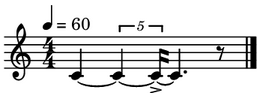
- splitAt(offset, tie=True, nomerge=False)[source]
Split this event at the given absolute offset
- Parameters:
offset (
Union[int,float,Fraction,tuple[int,Union[int,float,Fraction]]]) – the absolute offset (in beats) at which to split this event. Can be a beat or a location as a tuple(measureindex, beatoffset).tie – tie the parts. The returned events are tied.
nomerge – if True, adds a break symbol to the events resulted in the split operation to prevent them from being merged when converted to notation.
- Return type:
tuple[Self,...]- Returns:
a tuple with the parts. If the offset lies at the start or end of this event, only one part will be returned. The returned events are parentless.
- Raises:
ValueError – if the offset does not intersect this event
Example
>>> n = Note(60, 4)
>>> n.splitAt(2)
(4C~:2♩, 4C:2♩)
>>> n = Note(60, 3.5)
>>> notes = n.splitAt(1.8)
>>> notes[1].addSymbol('>')
>>> Chain(notes)
- splitAtOffsets(offsets, tie=True, nomerge=False)[source]
Split this event at the given offsets
- Parameters:
offsets (
list[Union[int,float,Fraction,tuple[int,Union[int,float,Fraction]]]]) – absolute offsets. To use score locations, convert those to absolute offsets viascorestruct.locationToBeattie – if True, tie the parts
nomerge – if True, adds a break symbol to the events resulted in the split operation to prevent them from being merged when converted to notation
- Return type:
list[Self]- Returns:
the parts. The total duration of the parts should sum up to the duration of self
- synthEvents(instr='', delay=None, args=None, gain=None, chan=None, pitchinterpol='', fade=None, fadeshape='', position=None, skip=None, end=None, sustain=None, workspace=None, transpose=0.0, **kwargs)
Returns the SynthEvents needed to play this object
All these attributes here can be set previously via
playargs(or usingsetPlay())- Parameters:
gain (
Optional[float]) – modifies the own amplitude for playback/recording (0-1)delay (
Optional[float]) – delay in seconds, added to the start of the object As opposed to the .offset attribute of each object, which is defined in quarternotes, the delay is always in seconds. It can be negative, in which case synth events start the given amount of seconds earlier.instr – which instrument to use (see defPreset, definedPresets). Use “?” to select from a list of defined presets.
chan (
Optional[int]) – the channel to output to. Channels start at 1pitchinterpol – ‘linear’, ‘cos’, ‘freqlinear’, ‘freqcos’
fade (
Union[float,tuple[float,float],None]) – fade duration in seconds, can be a tuple (fadein, fadeout)fadeshape – ‘linear’ | ‘cos’
args (
Optional[dict[str,float]]) – named arguments passed to the note. A dict{paramName: value}position (
Optional[float]) – the panning position (0=left, 1=right)skip (
Optional[float]) – start playback at the given beat (in quarternotes), relative to the start of the object. Allows to play a fragment of the object (NB: this trims the playback of the object. Usedelayto offset the playback in time while keeping the playback time unmodified)end (
Optional[float]) – end time of playback, in quarternotes. Allows to play a fragment of the object by trimming the end of the playbacksustain (
Optional[float]) – a time added to the playback events to facilitate overlapping/legato between notes, or to allow one-shot samples to play completely without being cropped.workspace (
Optional[Workspace]) – a Workspace. If given, overrides the current workspace. It’s scorestruct is used to determine the mapping between beat-time and real-time.transpose (
float) – an interval to transpose any pitch
- Return type:
list[SynthEvent]- Returns:
A list of SynthEvents (see
SynthEvent)
Example
>>> from maelzel.core import *
>>> n = Note(60, dur=1).setPlay(instr='piano')
>>> n.synthEvnets(gain=0.5)
[SynthEvent(delay=0.000, gain=0.5, chan=1, fade=(0.02, 0.02), instr=piano)
 bps 0.000s:  60, 1.000000
     1.000s:  60, 1.000000]
>>> play(n.synthEvents(chan=2))
- timeRange()
Returns a tuple (starttime, endtime), in seconds
- Return type:
tuple[Fraction,Fraction]- Returns:
a tuple
(starttime: F, endtime: F), where starttime and endtime are both absolute times in seconds
- timeScale(factor, offset=Fraction(0, 1))
Create a copy with modified timing by applying a linear transformation
- Parameters:
factor (num_t) – a factor which multiplies all durations and start times
offset (num_t) – an offset added to all start times
- Return type:
Self
- Returns:
the modified object
- timeShift(offset)
Return a copy of this object with an added offset
- Parameters:
offset (time_t) – a delta time added
- Return type:
Self
- Returns:
a copy of this object shifted in time by the given amount
- timeShiftInPlace(offset)
Shift the time of this by the given offset (inplace)
- Parameters:
offset (time_t) – the time delta (in quarterNotes)
- Return type:
None
- timeTransform(timemap, inplace=False)[source]
Apply a transformation to the time axes of this event
- Parameters:
timemap (
Callable[[Fraction],Fraction]) – a callable mapping time (in quarterbeats) to time (in quarterbeats)inplace – transform the object in place
- Return type:
Self- Returns:
the transformed object, or self if inplace is True
- transpose(interval)
Transpose this object by the given interval
- Parameters:
interval (int | float) – the interval in semitones
- Return type:
Self
- Returns:
the transposed object
- transposeByRatio(ratio)
Transpose this by a given frequency ratio, if applicable
A ratio of 2 equals to transposing an octave higher.
- Parameters:
ratio (float) – the ratio to transpose by
- Return type:
Self
- Returns:
a copy of this object, transposed by the given ratio
Example
>>> from maelzel.core import *
>>> n = Note("4C")
# A transposition by a ratio of 2 results in a pitch an octave higher
>>> n.transposeByRatio(2)
5C
- unquantizedScore(title='')
Create a maelzel.scoring.UnquantizedScore from this object
- Parameters:
title – the title of the resulting score (if given)
- Return type:
UnquantizedScore- Returns:
the Arrangement representation of this object
An
UnquantizedScoreis a list ofUnquantizedPart, which is itself a list ofNotation. It represents a score in which the Notations within each part are not split into measures, nor organized in beats. To generate a quantized score seequantizedScore()This method is mostly used internally when an object is asked to be represented as a score. In this case, an UnquantizedScore is created first, which is then quantized, generating a
QuantizedScoreSee also
- withExplicitOffset(forcecopy=False)
Copy of self with explicit times
If self already has explicit offset and duration, self itself is returned. If you relie on the fact that this method returns a copy, use
forcecopy=True- Parameters:
forcecopy – if forcecopy, a copy of self will be returned even if self already has explicit times
- Return type:
Self
- Returns:
a clone of self with explicit times
Example
>>> n = None("4C", dur=0.5)
>>> n
4C:0.5♩
>>> n.offset is None
True
# An unset offset resolves to 0
>>> n.withExplicitTimes()
4C:0.5♩:offset=0
# An unset duration resolves to 1 quarternote beat
>>> Note("4C", offset=2.5).withExplicitTimes()
4C:1♩:offset=2.5
- write(outfile, backend='', resolution=0, format='')
Export to multiple formats
Formats supported: pdf, png, musicxml (extension: .xml or .musicxml), lilypond (.ly), midi (.mid or .midi) and pickle
To configure any options either modify the active config or use
setConfig()for self. You can also use a config as context manager to temporary change the active config- Parameters:
outfile (
str) – the path of the output file. The extension determines the format. Formats available are pdf, png, lilypond, musicxml, midi, csd and pickle.backend – the backend used when writing as pdf or png. If not given, the default defined in the active config is used (key: ‘show.backend’). Possible backends:
lilypond;musicxml(uses MuseScore to render musicxml as image so MuseScore needs to be installed)resolution (
int) – image DPI (only valid if rendering to an image) - overrides the config key ‘show.pngResolution’format – the format to write to. If not given, the format is inferred from the extension of the output file. If the extension is not recognized, an error is raised. One of ‘pdf’, ‘png’, ‘lilypond’, ‘musicxml’, ‘midi’, ‘csd’, ‘pickle’.
- Return type:
None
Formats
pdf, png: will render the object as notation and save that to the given format
lilypond:
.lyextension. Will render the object as notation and save it as lilypond text- midi:
.midor.midiextension. At the moment this is done via lilypond, so the midi produced follows the quantization process used for rendering to notation. Notice that midi cannot reproduce many features of a maelzel object, like microtones, and many complex rhythms will not be translated correctly
- midi:
- pickle: the object is serialized using the pickle module. This allows to load it
via
pickle.load:myobj = pickle.load(open('myobj.pickle'))
Example
chain = Chain(...)
with CoreConfig({'show.voiceMaxStaves': 2, 'show.staffSize': 12}):
    chain.write('chain.pdf')